> ## Documentation Index
> Fetch the complete documentation index at: https://densify-sync-changelog-2.mintlify.site/llms.txt
> Use this file to discover all available pages before exploring further.

# Overview

export const InlineImageWithText = ({src, href, children, width = 80, caption}) => {
  return <span className="inline-flex items-center gap-3 align-middle">
            <a href={href} className="inline-block border-b-0">
                <Frame caption={caption}>
                    <img src={src} alt="" className="object-contain align-middle " width={width} style={{
    minWidth: width
  }} />
                </Frame>
            </a>
            <span className="align-middle">{children}</span>
        </span>;
};

<InlineImageWithText src="/images/docs-kubex/Content/Kubex/03000004.png">
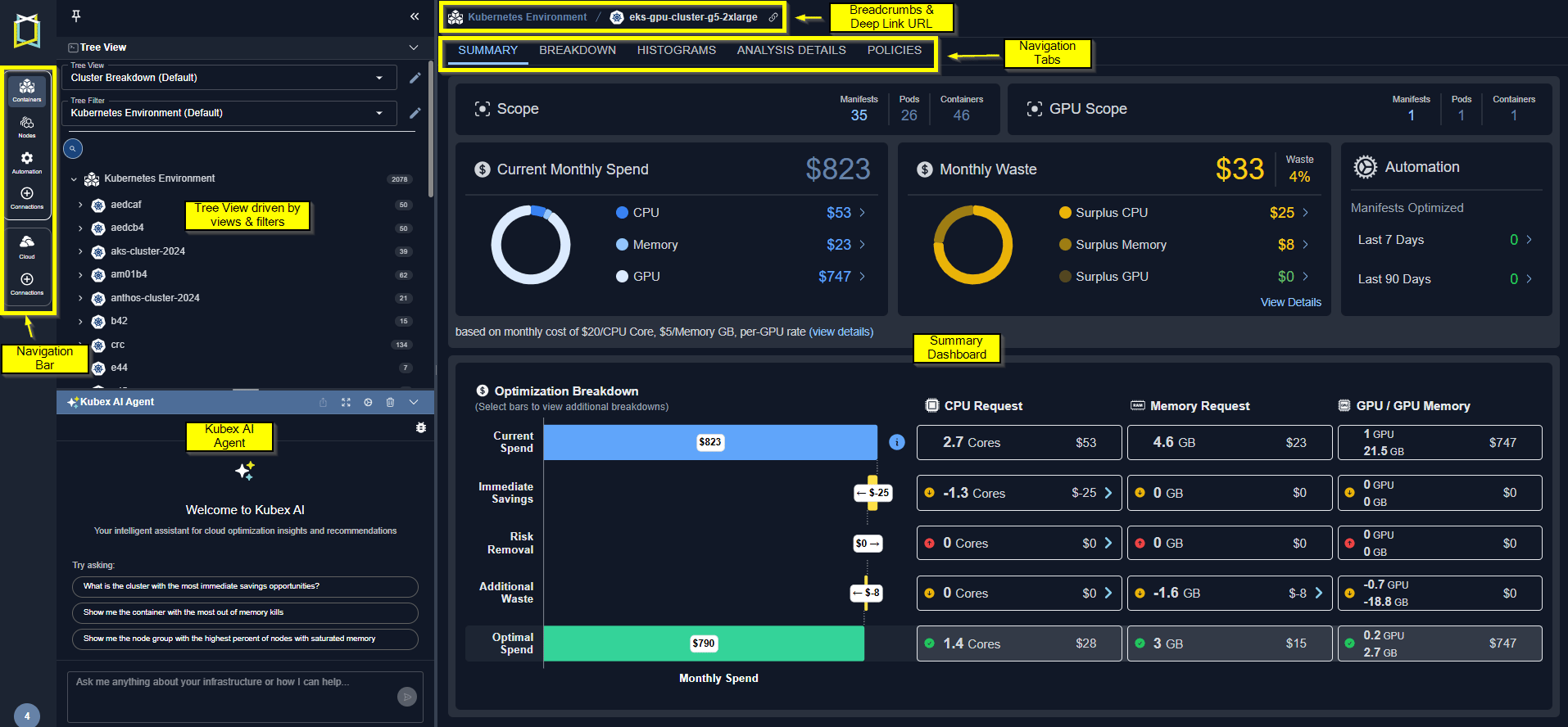
  Kubex provides a simple yet powerful interface to optimize your container environments. The <a href="/docs-kubex/Content/Kubex/Using_the_Tree_Viewer">tree viewer</a> offers an intuitive and efficient way to navigate and explore your Kubernetes environment.
</InlineImageWithText>

<br />

<br />

<Frame caption="Figure: Container Analysis">
  <img src="https://mintcdn.com/densify-sync-changelog-2/_QFurq0mJrs1QK9R/images/docs-kubex/k8s_visualizingdata.png?fit=max&auto=format&n=_QFurq0mJrs1QK9R&q=85&s=aa622c58ada533926b9be5ec8779b207" alt="" width="1914" height="888" data-path="images/docs-kubex/k8s_visualizingdata.png" />
</Frame>

The following tabs are available at the folder level in the tree viewer:

<ul>
  <li>
    <a href="/docs-kubex/Content/Kubex/Summary_Tab"> Summary </a>
    \--Shows you a summary of how effectively your resources are being utilized.
  </li>

  <li>
    <a href="/docs-kubex/Content/Kubex/Breakdown_Tab"> Breakdown </a>
    \--Shows you a breakdown of the items, selected in the tree view. Systems at risk and those with wasted resources are clearly indicated.
  </li>

  <li>
    <a href="/docs-kubex/Content/Kubex/Histograms_Tab"> Histograms </a>
    \--Shows you the selected scope of your environment as  a set of histograms.
  </li>

  <li>
    <a href="/docs-kubex/Content/Kubex/AI_Analysis_Details_Tab"> Analysis Details </a>
    \--Shows analysis details of the selected scope of your environment in various tabular views with utilization charts for selected systems.
  </li>

  <li>
    <a> Policy </a>
    \--Shows all the analysis policies used by the selected scope of containers.
  </li>
</ul>

The following tabs are available at an individual manifest level in the tree viewer:

<ul>
  <li>
    <a href="/docs-kubex/Content/Kubex/Overview_Tab"> Overview </a>
    \--Shows you an overview of the selected container manifest.
  </li>

  <li>
    <a href="/docs-kubex/Content/Kubex/Metrics_Viewer_Tab"> Metrics Viewer </a>
    \--Provides detailed metrics for the selected container manifest.
  </li>

  <li>
    <a href="/docs-kubex/Content/Kubex/GPU_Tab"> GPU </a>
    \--This tab appears when a single container manifest with GPU resources is selected.
  </li>

  <li>
    <a> Policy </a>
    \--Shows the analysis policy used by the selected container manifest.
  </li>

  <li>
    <a> Automation </a>
    \--Shows the automation state for the selected container manifest.
  </li>
</ul>

You can also review your node group infrastructure using the [Node Group](/docs-kubex/Content/Kubex/Node_Group_Analysis) features.

#### Video Resources

<AccordionGroup>
  <Accordion title="Kubex UI Overview">
    <iframe frameborder="0" height="310" src="https://player.vimeo.com/video/1052046936?badge=0&autopause=0&player_id=0&app_id=58479" width="550" />

    <a href="https://player.vimeo.com/video/1052046936?badge=0&autopause=0&player_id=0&app_id=58479" target="_blank">Kubex UI Overview</a>
  </Accordion>

  <Accordion title="Using Histograms">
    <iframe frameborder="0" height="310" src="https://player.vimeo.com/video/1039069463?title=0&byline=0&portrait=0&badge=0&autopause=0&player_id=0&app_id=58479" width="550" />

    <a href="https://player.vimeo.com/video/1039069463?title=0&byline=0&portrait=0&badge=0&autopause=0&player_id=0&app_id=58479" target="_blank">Using Histograms</a>
  </Accordion>

  <Accordion title="Using the Tree Viewer">
    <iframe frameborder="0" height="310" src="https://player.vimeo.com/video/1038945637?title=0&byline=0&portrait=0&badge=0&autopause=0&player_id=0&app_id=58479" width="550" />

    <a href="https://player.vimeo.com/video/1038945637?title=0&byline=0&portrait=0&badge=0&autopause=0&player_id=0&app_id=58479" target="_blank">Using the Tree Viewer</a>
  </Accordion>
</AccordionGroup>
